
Most website projects begin with a designer opening a canvas and drawing a homepage. The full page list, the structure, and how anyone will actually find the site come later, if at all. That order is a large part of why so many sites get rebuilt within two years.
Structure decisions are the expensive ones to change. Moving a button is minutes of work. Redoing your page hierarchy, URLs, and navigation after launch means redirects, lost rankings, and rework across every template. Getting it right on paper first costs almost nothing.
This guide covers why structure comes before visual design, the pages most sites need, how to map hierarchy and navigation, the one page one job rule, the SEO groundwork to lock in early, and a checklist to clear before design starts.
Why Structure Comes Before Visual Design
- Design decisions follow structure: you cannot design a navigation menu until you know the pages, and you cannot design a template until you know how many pages will share it.
- Structure is what search engines read: Google understands a site through its pages, URLs, internal links, and hierarchy. A polished site with a flat pile of unrelated pages is hard to rank.
- Rebuilds are structural: almost nobody rebuilds a site over colors. They rebuild because the structure could not fit new services, the URLs were a mess, or nothing could rank.
The Pages Most Websites Need
Every business is different, but a small business site usually needs a version of these, each with a clear job in the funnel:
- Homepage: says what you do, for whom, and where to go next. It is not the place to explain everything.
- Services or products: one page per distinct offering, not a single page listing all of them. These are your main ranking and conversion pages.
- About: builds trust with who you are, why you do this, and proof you can be relied on.
- Case studies or portfolio: evidence of outcomes, ideally with specific numbers.
- Contact: one clear path to get in touch, reachable from every page.
- Blog or resources: captures people earlier in their research and feeds internal links to your service pages.
- Trust and legal: testimonials, pricing if you show it, privacy policy, and terms.
Map the Hierarchy and Navigation
Once you have the page list, arrange it.
- Keep it shallow: important pages should be reachable in two or three clicks from the homepage. A service page four levels deep reads as minor to both users and Google.
- Group logically: services under Services, articles under the blog. The structure should be guessable.
- Limit primary navigation to five to seven items. Beyond that, nothing stands out. Secondary pages go in the footer or inside section pages.
- Plan URLs now: short, lowercase, words separated by hyphens, and structured to match the hierarchy, for example /services/website-development. Decide the pattern before anything is built so you never have to migrate it.
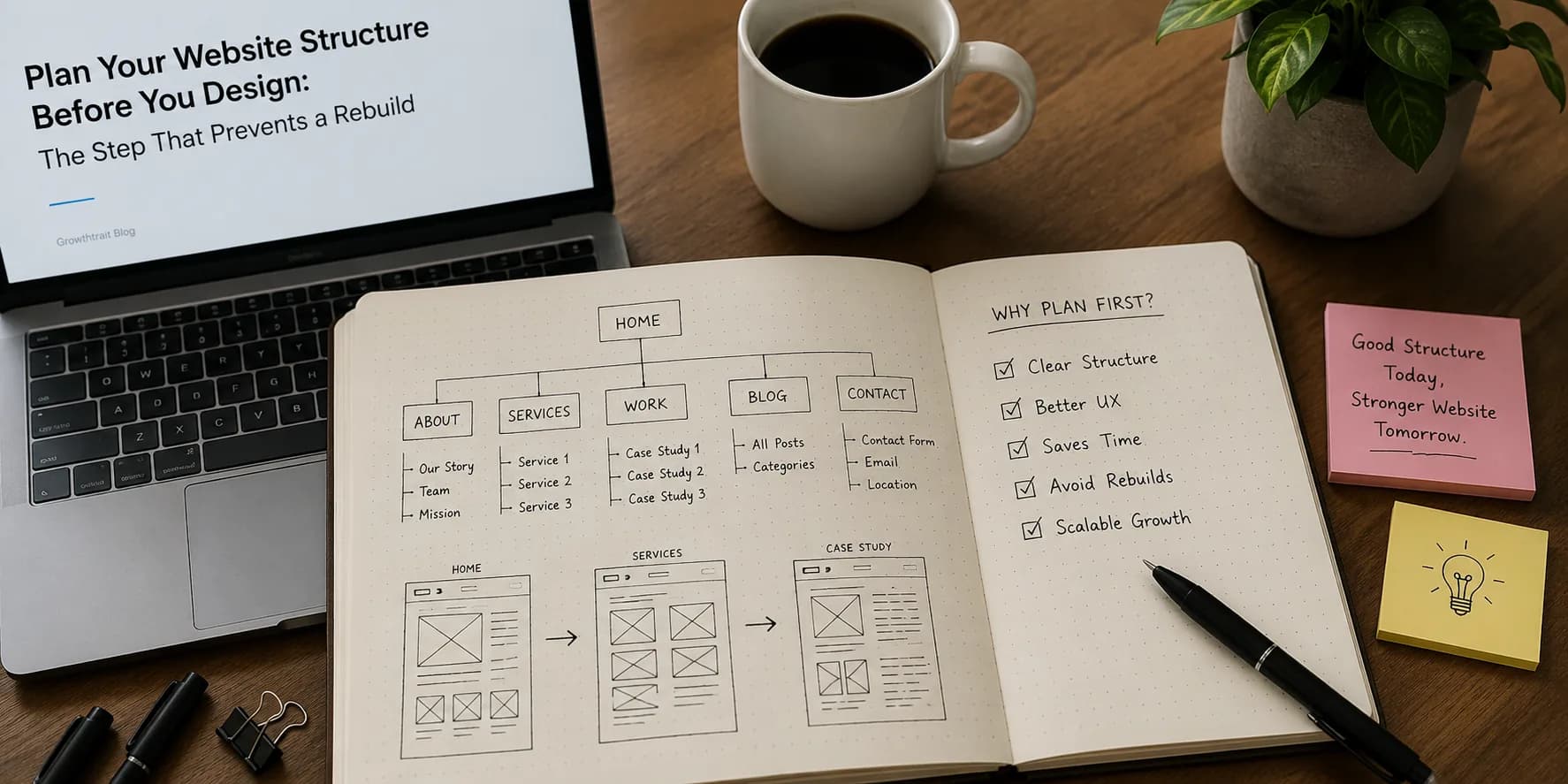
- Sketch it as a simple tree or a spreadsheet. It does not need a tool, it needs to be agreed before design.
One Page, One Job
Every page should have a single primary purpose and a single main call to action. A services page that also tells the company story, lists every plan, and asks for newsletter signups converts worse than one focused on getting a qualified enquiry.
For each page, write one sentence: this page exists to get a specific visitor to take a specific action. If you cannot write it, the page is not ready to design, and it may not need to exist.
Lock In the SEO Groundwork Early
A few decisions are cheap now and expensive later:
- One target search topic per page: each important page should own one primary topic and the term people use for it. Two pages targeting the same term compete with each other, so do the keyword research before finalizing the page list.
- Draft a title tag and meta description per page alongside the structure, so every page has a reason to exist in search.
- Plan internal links: decide which pages are the priority ranking pages and how supporting content will link to them. Our guide on internal linking covers the model.
- Set a clean URL pattern once and keep it, or accept redirects and lost ranking strength later.
- Plan analytics and Search Console for launch day, not months in, so you have data from the start.
- If you are replacing a site, map every old URL to its new home before launch so you keep the rankings you already have.
The Checklist to Clear Before Design Starts
- A full page list, each page with a one-sentence purpose.
- A site tree showing hierarchy and click depth.
- Primary navigation and footer navigation decided.
- A URL pattern chosen.
- One target topic, a draft title, and a draft meta description per key page.
- Priority ranking pages identified, with an internal linking plan sketched.
- For a replatform, a complete old to new URL redirect map.
- Analytics and Search Console setup planned for launch day.
Where to Start
Before anyone opens a design tool, get the page list, the site tree, and the SEO groundwork agreed in a short document. It takes a few hours, and it is the difference between a site that grows with the business and one that gets torn down in eighteen months. Design is faster and better when it has a structure to work with.
Our website development service starts with structure and SEO groundwork, then designs on top, so the site is built to rank and convert from launch. Contact us if you want help mapping it out.
Frequently asked questions
What pages does a small business website need?
Most small business sites need a homepage, one page per service or product, an about page, case studies or a portfolio, a contact page, a blog or resources section, and trust and legal pages such as testimonials, privacy policy, and terms. Each should have one clear job in the funnel.
Should I plan website structure or design first?
Structure first. Design decisions depend on the page list and hierarchy, and structural changes after launch are the expensive ones because they involve URLs, redirects, navigation, and every template. Agreeing structure on paper first costs little and prevents a rebuild.
How many levels deep should a website be?
Keep important pages within two or three clicks of the homepage. Deep pages receive less internal authority and are treated as less important by search engines, so a shallow structure with a focused primary navigation of five to seven items works best for most sites.
What is website information architecture?
It is how a site's content is organized and labeled: the page list, the hierarchy, the navigation, and the URL structure. Good information architecture makes a site easy for visitors to navigate and easy for search engines to crawl and understand.
How do I avoid losing SEO when redesigning a website?
Before launch, map every existing URL to its new location and set 301 redirects, keep or improve the content on pages that already rank, preserve title tags and headings where they work, and monitor Search Console closely for the first month after launch to catch crawl errors and ranking drops.
Need help with this?
Growthtrait can help you put this into practice. Let's talk about your goals.
Contact us