
Most meetings end the same way: someone promises to send the notes, someone else promises to put the plan in a spreadsheet, and half of it never happens. Anthropic's latest Claude launch goes after exactly that gap. Claude can now sit in the meeting as a participant, write the plan while people talk, and build the spreadsheet that tracks it.
On November 10, 2026, Anthropic introduced Claude Sheets, Claude Whiteboards and Claude Data, and on November 12 it began rolling out Claude Meetings in beta. Together they move Claude from a chat window you visit into the tools where teams actually work, putting it in direct competition with Microsoft 365 Copilot and Google Workspace.
This guide focuses on the two products most teams will touch first, Claude Meetings and Claude Sheets: what they do, who can use them, how privacy works, what they cost, their current limits, and practical ways a marketing or e-commerce team can use them this month.
What Is Claude Meetings?
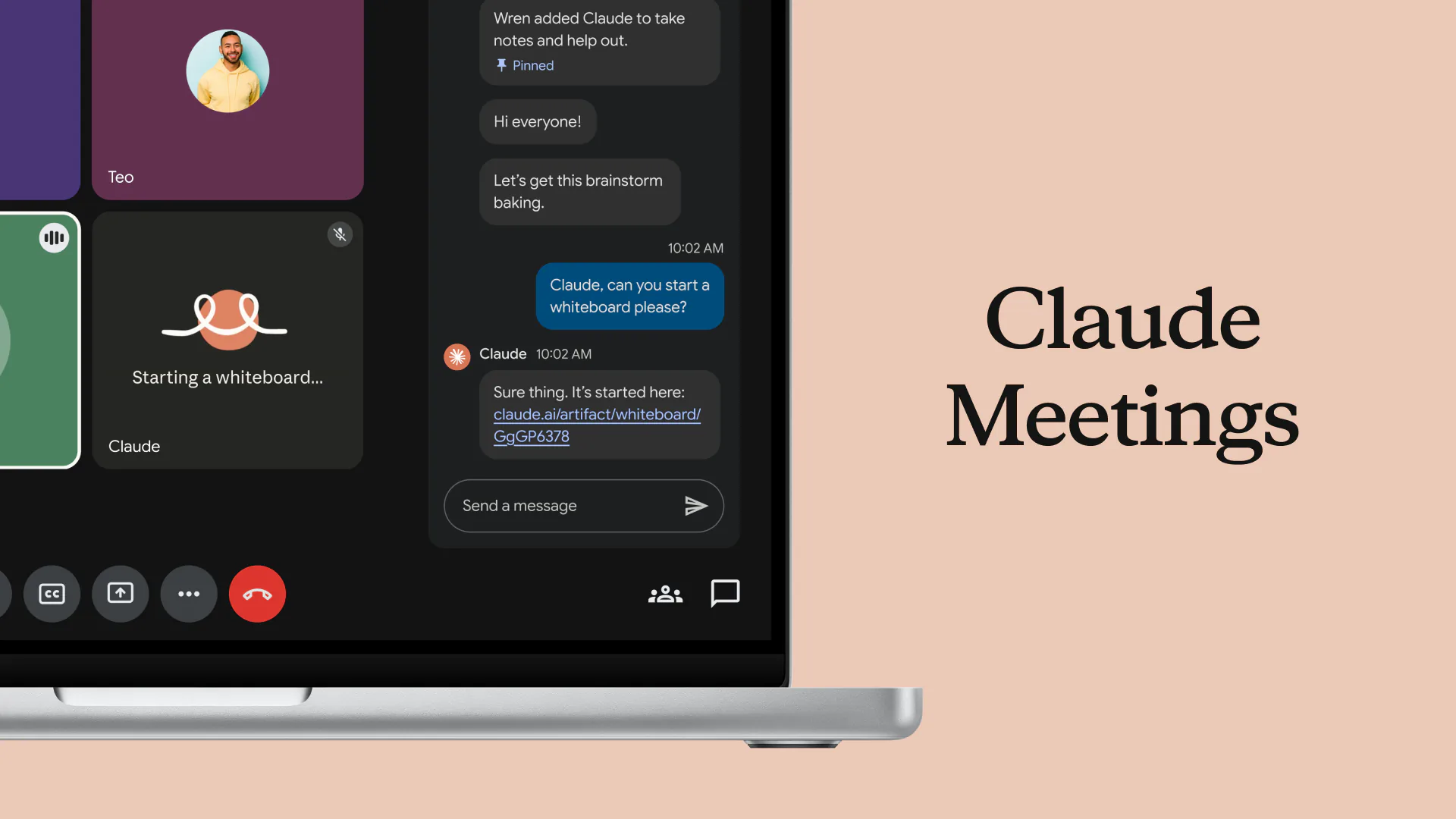
Claude Meetings lets you add Claude to a Google Meet call as a visible participant. According to Anthropic's help article, it can take notes, answer questions, and build docs, whiteboards and slides during the call. You talk to it directly, for example “Claude, make a doc” or “Claude, make a whiteboard,” and it answers in the meeting chat by default.
After the call, the notes, transcript and anything Claude built live on a meeting page in claude.ai, which colleagues on the invite can view, edit and share within the organization. Anthropic also says transcripts from Gong, Attention, Granola, Fireflies.ai, Otter and Plaud will be usable with Claude “soon.”
How to set it up
- Open Meetings in Claude.
- Connect Google Calendar. An organization owner has to allow Google Calendar first.
- Pick a meeting from your calendar and click “Add Claude.”
- Optional: turn on auto-join under Settings, Capabilities, Meetings, for all meetings or all except one-on-ones.
Claude can stay in a call for up to eight hours and warns before it leaves. When it needs one of your connected tools, such as a CRM or a drive, it asks each person for permission the first time.
Who can use it
- Plans: Team and Enterprise only, in beta, on the Claude web app and Claude Desktop. It is not available on Free, Pro, Max or Ultra.
- Platforms: Google Meet only for now. Anthropic says other platforms are “coming soon,” and a spokesperson told Computerworld that Microsoft Teams is planned. Zoom has not been mentioned.
- Excluded organizations: those using zero data retention, HIPAA-ready configurations or customer-managed encryption keys cannot use it yet.
- Defaults: on Team plans it is on by default and an owner can turn it off. On Enterprise plans an owner has to turn it on.
How Does Claude Meetings Handle Privacy?
Putting an AI in every meeting raises obvious questions. Here is what Anthropic says:
- Claude appears as a named participant and posts a notice in the meeting chat.
- It saves a transcript, a summary and descriptions of what is shown on screen, but not audio.
- By default, Claude stays out of a call when someone outside your organization is invited, and leaves if an outside guest joins partway through. An owner can allow external guests. On Team plans this is allowed by default; on Enterprise it is off until an owner changes it.
- When guests are allowed, Claude posts its notice but does not reply in the chat, and what guests say goes into the notes and transcript. Guests do not get the meeting page or recap email.
- Anthropic's own advice is to “make sure everyone on your call is okay with being transcribed” before adding Claude or turning on auto-join.
What Anthropic has not published yet is how long meeting transcripts are kept. Analysts also urge caution. Craig Durr of The Collab Collective told Computerworld that “recording and consent rules vary by jurisdiction and by company policy,” and that “IT, legal, and HR should agree on when Claude is allowed into a meeting before it's rolled out.” Gartner called it “a beta entrant in a mature market” and advised companies not to extend Claude into meetings until it proves it can work within their approved meeting platform, privacy and support model.
For Team plan customers in particular, note that both Claude Meetings and external guest access are on by default. If your company talks to clients on Google Meet, review those two settings before anyone turns on auto-join.
What Is Claude Sheets?
Claude Sheets is a spreadsheet that you build and edit together with Claude. You can ask for something like a campaign tracker or a hiring budget and Claude creates a working sheet, then you and Claude edit the same cells. According to the Sheets help article, Claude can:
- Add tabs and write formulas that work across tabs, using 144 supported functions.
- Apply conditional formatting and add dropdowns, checkboxes and charts, including bar, line and pie charts.
- Outline each edit as it lands, so you can see exactly what Claude changed.
- Import from CSV, Google Sheets or Excel, or start from a blank sheet, and export to .xlsx or CSV.
You can comment on cells, restore earlier versions from version history, and share a sheet so teammates work in it alongside you and Claude.
Who can use it
- Plans: beta on Pro, Max, Ultra, Team and Enterprise. Not on the Free plan.
- Devices: full editing on the web and desktop apps. Mobile is basic and read-only.
- Defaults: on by default for Team plans. On Enterprise, off until an owner turns it on under Organization settings, Artifacts.
- Excluded organizations: HIPAA, customer-managed encryption key and zero data retention setups are not supported yet.
What Can't Claude Sheets Do Yet?
Anthropic itself describes Sheets as “simple spreadsheet functionality” for now and points users who need full Excel features to export, or to its Claude for Excel add-in. The help article lists the gaps:
- Size: up to 100,000 cells per sheet.
- Not yet supported: pivot tables, protected ranges, find and replace, multi-column sort, filter views, multi-select dropdowns and PDF export.
- Excel features not supported: macros, VBA, Power Query, DAX and print layout.
- No live data: Sheets cannot pull live data from connected apps such as your CRM or ad platforms, and Claude's docs, decks and dashboards cannot use a sheet as a data source.
In practice, Claude Sheets is best for planning, tracking and light analysis that a team builds together, not for heavy financial models or reporting that needs to refresh on its own. For live reporting from a data warehouse or CRM, Anthropic's separate product, Claude Data, is the better fit.
How Much Do Claude Meetings and Sheets Cost?
Neither product has a separate price. Both are included in paid plans, with some details:
- Claude Meetings: notes, transcripts and answers that do not use your connected tools are included on Team and Enterprise plans. Docs and whiteboards made in a meeting are free through February 10, 2027. Anything that uses a connected tool counts toward the user's normal usage.
- Claude Sheets: counts toward your plan's usage limits, like other Claude work.
What Else Launched Alongside Them?
- Claude Whiteboards (beta): a shared board where Claude turns a discussion into timelines, owners and grouped ideas, which can then become a doc or deck or be sent to Lucid, Miro or Zoho Vani. It also works inside Claude Meetings, so the board builds while people talk.
- Claude Data (generally available): formerly Claude Dashboards, it connects to a warehouse or CRM and turns questions into dashboards, data stories or narrated videos.
- Interactive connectors: apps such as Canva, Asana, monday.com and Webflow can now open inside Claude, and Claude can edit them while you watch.
How Can Marketing and E-commerce Teams Use Them?
- Campaign kickoffs: add Claude to the planning call, ask it to draft the brief and a whiteboard timeline during the meeting, then turn the timeline into a Sheets tracker with owners, dates and status dropdowns.
- Weekly performance meetings: export last week's numbers from your ad or analytics platforms as CSV, import into Claude Sheets, and ask Claude to add formulas for cost per acquisition and return on ad spend before the call. Remember it will not refresh on its own.
- Budget planning: ask Claude to build a quarterly budget by channel with a tab per month and a summary tab, then adjust it together with the team.
- Content calendars: build a shared calendar with dropdowns for channel and status, and conditional formatting for overdue items.
- Internal meetings only: keep client calls out of Claude Meetings until your team has agreed on consent and retention, especially if clients are in regions with strict recording rules.
Is It Ready to Use Today?
For internal planning and simple shared spreadsheets, yes, with the usual beta caution. Both products are new, and stability is still settling: on November 13, 2026, Anthropic's status page listed Claude in Meetings and connectors including Docs and Sheets as degraded during a wider incident.
A sensible rollout looks like this: start with Sheets on a few real trackers, test Meetings on internal calls with people who have agreed to it, review the admin defaults, and write down a short policy for when Claude may join a call. Keep your existing spreadsheet tool for anything that needs pivot tables, macros or live data.
If you want help deciding where Claude Meetings and Sheets fit in your team's workflow, and setting clear rules for using AI in meetings, our AI training program covers both. Contact us to plan a session.
Frequently asked questions
What is Claude Meetings?
Claude Meetings is a beta feature that adds Claude to a Google Meet call as a visible participant. It takes notes, answers questions in the chat and builds docs, whiteboards and slides during the call, then saves everything to a meeting page in claude.ai.
Which plans include Claude Meetings?
Claude Meetings is in beta on Team and Enterprise plans only. It is on by default for Team plans and must be turned on by an owner on Enterprise plans. Organizations using zero data retention, HIPAA-ready setups or customer-managed encryption keys cannot use it yet.
Does Claude Meetings record audio?
No. Anthropic says Claude saves a transcript, a summary and descriptions of what is on screen, but not audio. It appears as a participant and posts a notice in the meeting chat, and Anthropic advises making sure everyone on the call agrees to being transcribed.
Does Claude Meetings work with Zoom or Microsoft Teams?
Not yet. At launch it works only with Google Meet. Anthropic says other platforms are coming soon, and a spokesperson told Computerworld that Microsoft Teams is planned.
What can Claude Sheets do?
Claude Sheets builds and edits spreadsheets with you, with tabs, cross-tab formulas from 144 functions, conditional formatting, dropdowns, checkboxes and charts. It imports CSV, Google Sheets and Excel files and exports to .xlsx or CSV, up to 100,000 cells per sheet.
Can Claude Sheets replace Excel or Google Sheets?
Not for advanced work yet. Claude Sheets does not support pivot tables, macros, VBA, Power Query, filter views or live data from connected apps. It works best for planning and tracking, and you can export to .xlsx when you need full Excel features.
Need help with this?
Growthtrait can help you put this into practice. Let's talk about your goals.
Contact us