
Every marketer, founder, and knowledge worker I talk to captures more information than they can possibly use: meeting notes, saved articles, campaign ideas, customer insights, half-finished drafts. Almost none of it gets found again when it matters. The notes app becomes a graveyard, the bookmarks folder becomes a museum, and the idea you need next Tuesday is buried in a document you cannot remember naming.
A second brain fixes this, and Obsidian has quietly become the most popular place to build one. As of February 2026, Obsidian crossed 1.5 million users, growing 22 percent year over year, and its community has published more than 2,700 plugins. The core app is free for personal use, it stores everything in plain Markdown files that you own, and it works fully offline.
This guide covers what a second brain actually is, why Obsidian is the strongest tool for building one, how to set up the PARA structure and CODE workflow inside a vault, what Obsidian Sync costs and when it is worth paying for, and the AI plugin stack that turns a static note collection into a system that answers back.
What Is a Second Brain?
The term comes from Tiago Forte's book Building a Second Brain, and it rests on a simple premise: your brain is better at generating ideas than storing them. A second brain is an external, centralized, digital repository for the things you learn and the resources they come from. Instead of trusting memory, you trust a system.
Forte's method runs on a four-step loop called CODE:
- Capture: save the information and ideas that could be useful later, but only what genuinely resonates with you.
- Organize: file what you captured so it is retrievable when needed, not lost in an undifferentiated pile.
- Distill: extract the essence of each note so future you can find the key insight without re-reading everything.
- Express: use what you collected to create, decide, and communicate. This is the entire point of the system.
The design choice that separates a second brain from a conventional filing system is that information is organized by actionability rather than by topic. You do not ask "what subject does this belong to." You ask "when will I act on this."
Why Obsidian Is the Best Home for a Second Brain
Plenty of tools can hold notes. Obsidian earns the second brain role for three structural reasons.
First, it is local-first. Your vault is a folder of plain Markdown files sitting on your own device. There is no proprietary database, no export lock-in, and no risk that a subscription lapse takes your notes hostage. A vault you build today will still open in any text editor twenty years from now.
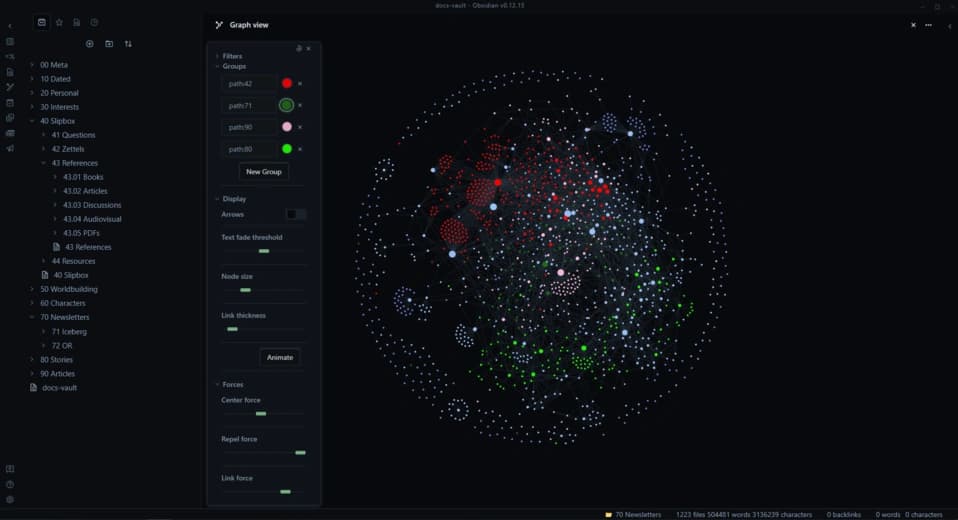
Second, it links the way ideas link. Bidirectional links and the graph view let any note reference any other note, so knowledge compounds instead of sitting in isolated folders. This matters enormously for the Express step, because connections you made months ago resurface exactly when you write about a related topic.
Third, the ecosystem is unmatched. With more than 2,700 community plugins, over 100 of them focused on AI, Obsidian can be shaped into whatever your workflow needs while staying lightweight at its core.
Obsidian and Obsidian Flames Are Not the Same Thing
A quick disambiguation, because search results genuinely mix these up. Obsidian Flames is the third main expansion of the Pokemon Trading Card Game's Scarlet and Violet series, released in English on August 11, 2023. It has nothing to do with the note-taking app. If you searched for obsidian flames looking for card lists, this is not that article. Everyone else now knows why their search results occasionally fill up with Charizard.
Setting Up PARA in Obsidian
PARA is Forte's organizational method, and it maps directly onto four top-level folders in your vault:
- Projects: active work with a clear outcome and a deadline, like "Q3 website relaunch" or "July newsletter."
- Areas: ongoing responsibilities with no end date, like "Clients," "Health," or "Team management."
- Resources: topics of interest that may be useful later, like "SEO research," "Copywriting examples," or "AI tools."
- Archives: anything inactive from the other three folders. Finished projects and dormant interests go here.
Add a fifth folder called Inbox as the single landing zone for everything you capture, and resist the urge to build anything deeper. The system works because a note moves between folders as its status changes. When a project finishes, its notes slide into Archives. When an archived resource becomes relevant to a new project, it slides back out. Actionability decides location, so the structure stays honest about what you are actually working on.
Running the CODE Workflow in Your Vault
The folders are the skeleton. CODE is the daily practice that keeps the system alive, and Obsidian has a native feature for each step.
Capture goes through the daily note. Open it with one hotkey, jot the idea, meeting takeaway, or link, and move on. The bar for capturing should be resonance, not completeness. If a piece of information makes you pause, it goes in. If you are saving it out of vague obligation, it does not.
Organize happens once a week, not in the moment. Set a recurring 20-minute review where you empty the Inbox into PARA folders. Deciding where things go in batches is dramatically faster than deciding at capture time.
Distill happens whenever you revisit a note. Bold the sentence that matters, add a one-line summary at the top, or pull the key numbers into a callout. Each pass makes the note faster to use next time.
Express is where the compounding pays off. When I draft a client proposal or a blog post, I start by searching the vault and following backlinks from related notes. Half the raw material already exists, written by a past version of me who knew things the current version forgot.
Obsidian Sync: Your Second Brain on Every Device
A second brain that only lives on your laptop fails the capture step, because ideas arrive on the bus, in meetings, and at 11pm on your phone. This is where Obsidian Sync comes in.
Obsidian Sync is the official syncing service, and it starts at 4 dollars per month billed annually on the Standard plan, which covers one synced vault with 1 GB of storage and one month of version history. The Plus tier at 10 dollars per month raises that to ten vaults and 10 GB of storage with twelve months of version history. Everything is protected with end-to-end AES-256 encryption, which means even the Obsidian team cannot read your notes, and shared vaults let small teams collaborate on a common knowledge base.
You can sync for free by placing your vault inside iCloud, OneDrive, or a Git repository, and plenty of people do. The tradeoffs are conflict handling and mobile reliability, which you manage yourself with the free routes. My take: if the vault becomes the system you run your work from, the Standard plan is the cheapest insurance you will buy.
Adding AI: The 2026 Second Brain Stack
The most interesting shift in the past year is that a second brain no longer has to be a passive archive. With over 100 AI plugins in the community library, your vault can now answer questions about itself.
Smart Connections is the most popular AI plugin in the ecosystem. It uses retrieval augmented generation to let you chat with your entire vault, surfacing related notes by meaning rather than keyword. Worth knowing before you install: the project switched from an MIT license to a proprietary one in January 2026 and moved several features behind a 99 dollar per year plan, so check which tier covers your use case.
The setup most Obsidian users land on in 2026 pairs Smart Connections for semantic linking with Copilot for Obsidian pointed at a local Ollama model. That combination covers roughly 80 percent of second brain use cases, including chat with your notes and semantic search, without sending a single word of your vault to a cloud provider. For a system that holds client information and unfinished thinking, local processing is not a nice-to-have.
Four non-AI plugins remain essential regardless of your AI choices:
- Dataview: query your notes like a database, for example listing every open project note that has not been touched in two weeks.
- Templater: consistent structures for daily notes, meeting notes, and project pages, so capture costs zero decisions.
- Calendar: a clickable month view that makes the daily notes habit stick.
- Excalidraw: freehand sketching and diagrams inside the vault, for the thinking that refuses to be linear.
Five Mistakes That Kill a Second Brain
- Capturing everything. Hoarding unread articles feels productive and is not. Resonance is the filter; if it did not make you pause, let it go.
- Designing the perfect structure before you have notes. Start with PARA plus an Inbox and let real use reshape it.
- Treating the vault as an archive instead of a workshop. If nothing you capture ever becomes a draft, a decision, or a deliverable, the system is decorative.
- Installing twenty plugins in week one. Every plugin adds friction and maintenance. Add one when you feel a specific pain, not before.
- Skipping the weekly review. An unprocessed Inbox stops being trusted within a month, and an untrusted system stops being used.
How to Start This Week
Download Obsidian, create a vault, and add five folders: Inbox, Projects, Areas, Resources, Archives. Turn on daily notes. For seven days, capture everything that resonates into the daily note without organizing anything. At the end of the week, run your first 20-minute review and file what you collected into PARA. That is the entire starting system, and it is more than most people ever build.
The second brain concept also scales beyond personal notes. The same capture and retrieval principles power the internal knowledge systems we help teams build in our AI training service, where a shared vault becomes the company's collective memory. If you want help designing a knowledge workflow your whole team will actually use, contact us and we will map it with you.
Need help with this?
Growthtrait can help you put this into practice. Let's talk about your goals.
Contact us